
Welcome screens, room info, conference signage — for every floor.
Greet guests at reception. Show today's restaurant menu in the lobby. Direct conference attendees to the right room. Pause the loop for an emergency message. Per-franchise content, central control.
The product, in use
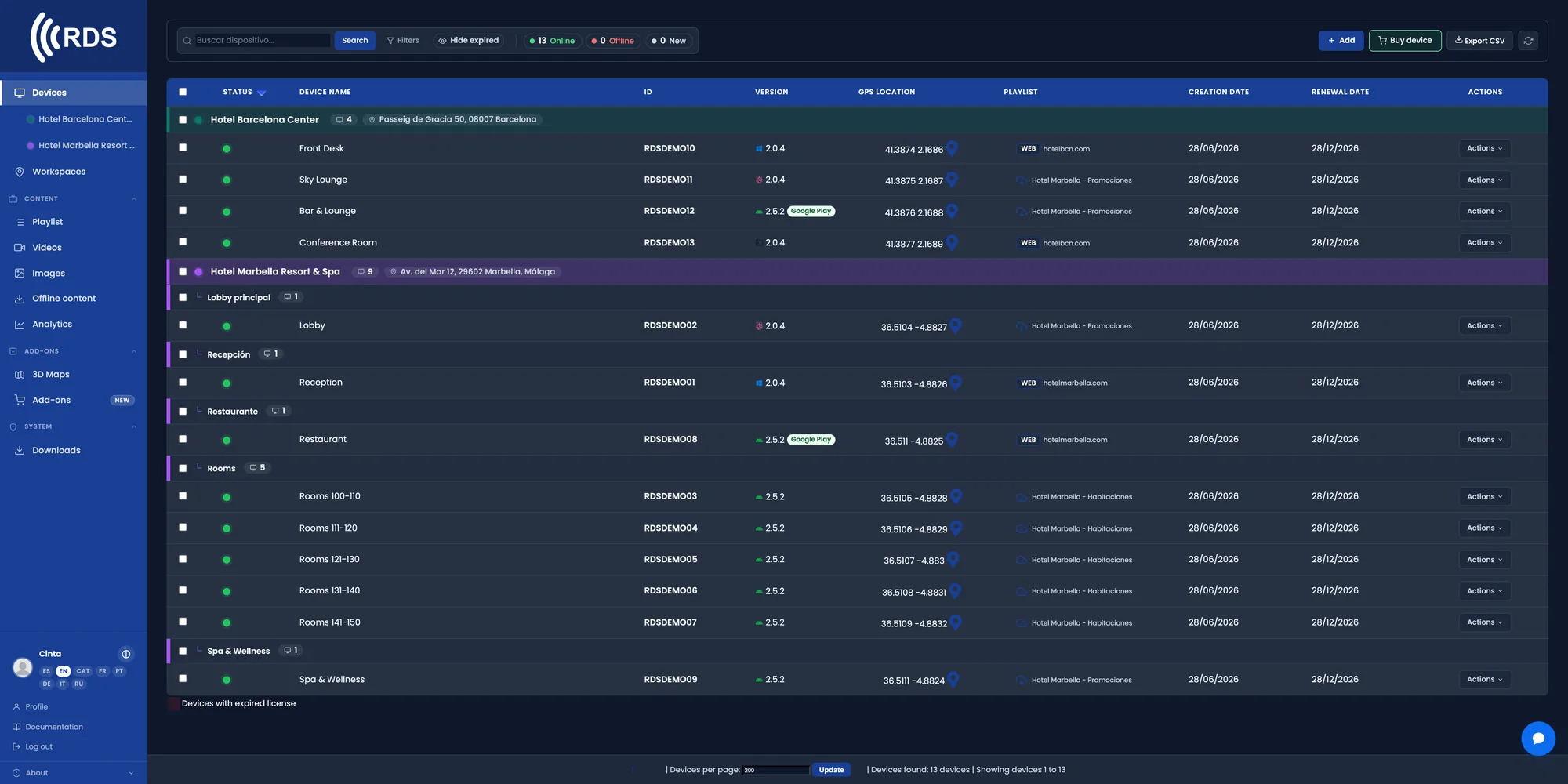
The whole hotel in one list
Reception, lifts, meeting rooms, gym and restaurant. Live status of every screen and what it is showing right now.

Group by building, floor or area
Every space in the hotel can show something different from the same panel. Assign content to a whole group in one go.

Breakfast, check-out and events, by the hour
Breakfast times in the morning, the meeting-room programme during the day, the restaurant menu at night. Scheduled once.

Several hotels, a single panel
Group by property and publish a chain-wide campaign to all of them at once, or something specific to just one.
Why it fits hotels
Information always up to date
Breakfast, spa or check-out times. Change the detail once and it appears on every screen that shows it.
Meeting room and event directory
Which meeting is in which room and at what time. Reception updates it from the browser, without calling anyone.
Content by area
Lobby, guest floors, restaurant and gym don't have to show the same thing. Each group gets its own playlist.
Built for international guests
A single playlist can alternate messages in several languages within the same cycle.
Chains and groups
Group by hotel and launch a chain-wide promotion across the whole network from a single panel.
3D Maps as an add-on
If the property is large, you can add an interactive 3D map with search and step-by-step routes to every point. New: an AI assistant answers guests using your property's own places and draws the route.
What guests look for
On the lobby touch screen you see which pages of the PDF guest guide get read, for how long, where people stop reading and where they tap, on a heatmap. No cameras: it counts taps, not people.
Common setups
Reception & welcome
Personalised welcome screens. Today's weather, events, restaurant hours.
Restaurant & spa promos
Different content per location. Dinner menu in the lobby, treatments by the pool.
Conference signage
"Boardroom A · 10:00 · ACME Strategy Off-site" — updated from a booking system or by hand.
Floor displays
Floor maps, available services, room service in 5 languages.
How it fits
Pair every screen
Android TV sticks, commercial displays, your existing in-room TVs.
Group by floor or department
Separate playlists for reception, restaurant, spa, conference rooms.
Update across the chain
Same content to all 10 hotels in one click, or per-property.
Installing on Android
Android phones and tablets with Google Play: install the app from Google Play, which keeps it up to date.

Signage players and other Android devices without Google Play: download the APK directly; updates are sent from your console.
Google Play and the Google Play logo are trademarks of Google LLC.
Pricing
Frequently asked questions
Can it be used for the meeting room directory?
Yes. You can publish an image or a web page with the day's programme and update it from reception whenever a booking changes.
Can I show different content on each floor?
Yes. Screens are grouped by space — building, floor or area — and each group can have its own playlist.
What happens if the internet goes down?
The player stores the content on the device and keeps showing the last thing it downloaded. Once the connection is back it syncs automatically.
Can a hotel chain be managed?
Yes. Each hotel can be a group within the same panel, with per-user permissions, and you can publish to one or to all of them at once.
OTHER INDUSTRIES
Start with the lobby.
30-day trial, no card. Includes 10 devices, 10 images and 10 videos — enough to cover reception, lifts and the restaurant in a real pilot.