
Your storefront, open 24/7 — without anyone inside.
Window-facing screens with for-sale and for-rent listings. Auto-rotating. Updated from the panel — no need to drive to the office. If your CRM already has the listings, we can pull them from there.
The product, in use
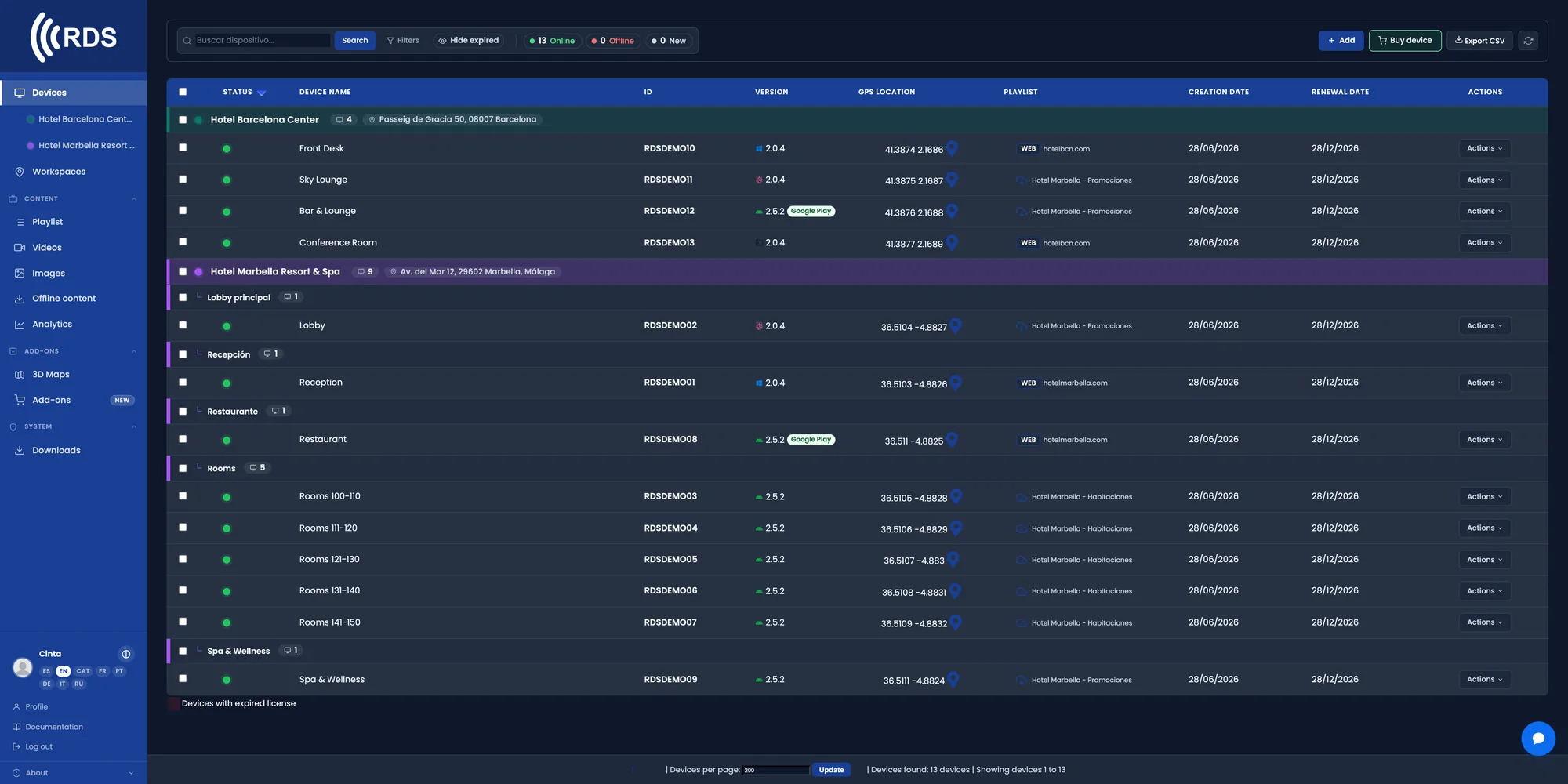
Every office and every window display
All the agency's screens in one list, with live status. You know whether the window display is playing without going to the branch.
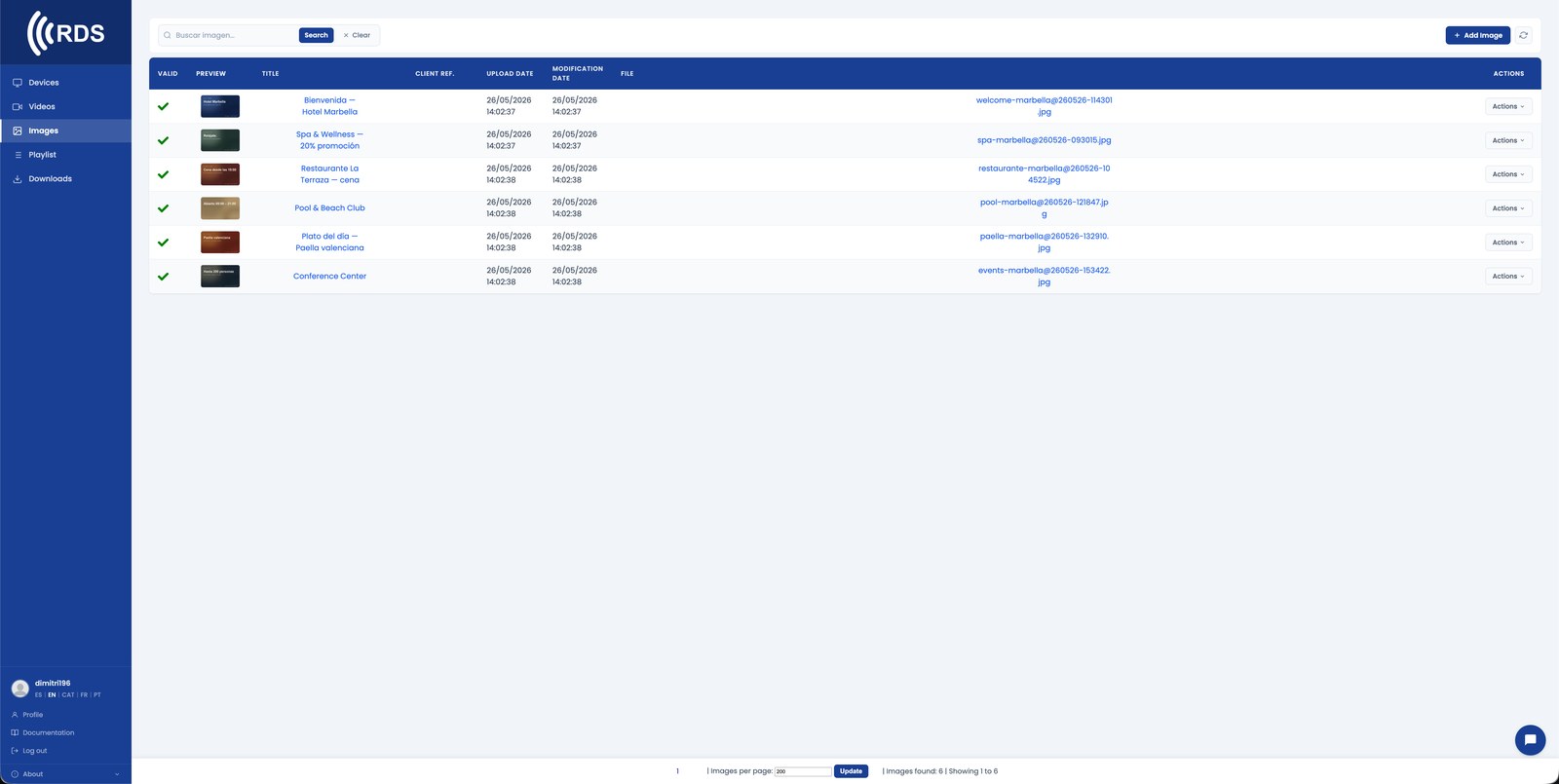
Upload the listings and let them rotate
One image per property with photo, price and reference. They cycle through on a loop and you pull a listing the moment it sells.

Walkthroughs of premium properties
Videos of featured properties join the same loop, between listings, with nothing extra to set up.

Sales by day, rentals in the afternoon
Each time slot can show a different selection. The window display keeps working after the office has closed.
Why it fits estate agencies
The window display never closes
The screen keeps showing your portfolio when the office is shut. A paper poster does not update; this does.
Remove what is sold in seconds
A flat sells and you take it out of the loop from your phone, without going to the branch to peel anything off.
No printed listings
Change the price or the photos from the panel. No more reprinting and rearranging posters on the glass.
Selection by time slot
New builds in the morning, rentals in the afternoon. Same screen, two different audiences.
Several offices
Each office can show its own portfolio, or the whole network the same campaign, from a single panel.
Video and photo in the same loop
Image listings and video walkthroughs coexist in the same loop, with no extra editing.
Which properties draw interest
If the window screen is a touch screen, you see which listings on your website get visited, for how long and where people tap. In the regular loop, how many times each property played and which ones fell short.
Common use cases
24/7 storefront
Screens behind the office window with listings rotating. You sell while the agency is closed — weekends, holidays, before opening.
Lobby kiosk
A touch screen in the waiting area so clients can browse listings, filter by area and price, and keep busy while waiting for an agent.
Team dashboard
In the office: market figures, daily leads, upcoming closings, scheduled viewings. One screen for the whole team, updated in real time.
Property walkthroughs
Looped video tours of premium listings. Cinematic quality in the window sells what A4 prints never could.
How it fits
Plug it in
An Android TV stick (€60), a tablet or a Linux mini-PC behind any HDMI screen. Power it on, pair with a 6-digit code.
Upload the listings
Poster images, walk-through videos, infographics with price and specs. Mix any format in the same playlist.
Edit from anywhere
Sold the downtown one — hide it from your phone in 3 seconds. Price change on another — the storefront reflects it instantly.
Installing on Android
Android phones and tablets with Google Play: install the app from Google Play, which keeps it up to date.

Signage players and other Android devices without Google Play: download the APK directly; updates are sent from your console.
Google Play and the Google Play logo are trademarks of Google LLC.
Pricing
Frequently asked questions
Can I remove a property as soon as it sells?
Yes. You log into the panel from your phone, take the listing out of the loop and the screen stops showing it on the next cycle.
Can I show listings from my CRM?
If your CRM publishes the listings on a web page, the screen can show that URL live. Write to us and we will look at your specific case.
Is it readable behind glass in direct sun?
That depends on the screen's brightness, not on the software. Window displays in full sun need a high-brightness monitor; the player and the panel work just the same.
Does it work for several offices?
Yes. You can group screens by office and publish a different portfolio in each one, or the same campaign across the whole network.
OTHER INDUSTRIES
Put your window display to work at night.
30-day trial, no card required. Includes 10 devices, 10 images and 10 videos — enough to set up the window display and one screen at reception.